
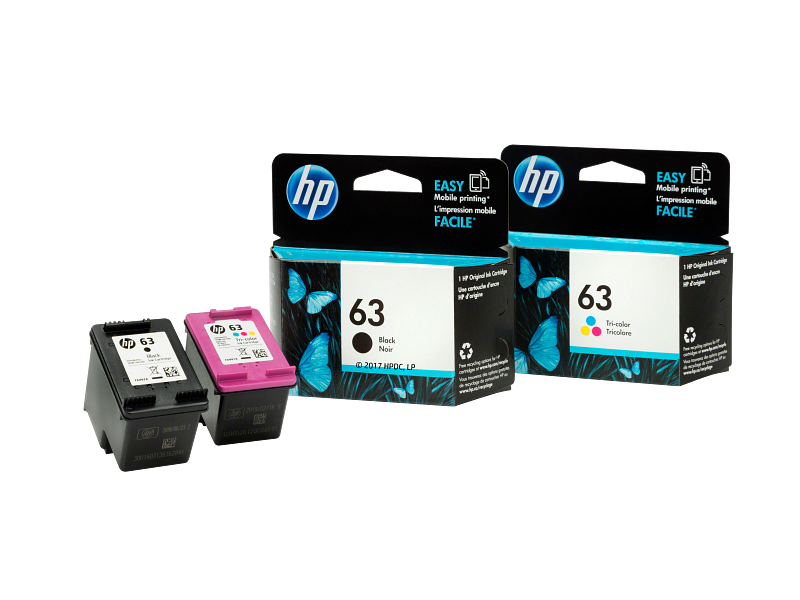
In the modern workspace, whether it resides in a corner of your living room or a dedicated home office, the printer remains a vital tool for transforming digital ideas into physical documents. Yet, the entire process hinges on a component that often goes overlooked until it runs dry: the ink cartridge. For millions of HP printer users, the HP 63 cartridge is the lifeblood of their machine. It is not merely a container of liquid; it is a sophisticated piece of technology that dictates the quality, longevity, and reliability of every printed page. However, the market is riddled with confusion regarding compatibility, genuine versus third-party options, and error messages that can bring work to a standstill. This comprehensive guide cuts through the noise. We will delve deep into the world of the Hp 63 ink system, exploring how to install it correctly, why it is inextricably linked to your printer’s health, and how to achieve printing results that look sharp and professional every single time.
In this article
- The Unique Identity of the HP 63 Cartridge
- Mapping the Chain of Compatibility
- Step-by-Step: A Flawless Installation Ritual
- Decoding the Language of Printer Errors
- The Economics of Genuine Ink vs. Alternative Suppliers
- Maintaining Peak Health Between Replacements
- Resolving the Most Stubborn Physical Faults
- A Future Outlook on Smart Printing
The Unique Identity of the HP 63 Cartridge
When you lift the lid of a printer and stare at the small, rectangular plastic component inside, it is easy to assume all ink cartridges are essentially the same. This is a costly misconception. The Hp 63 is a specific form factor with a unique microchip architecture designed to communicate exclusively with a defined range of HP printers. Unlike generic shapes, the physical dimensions, the nozzle placement, and the electrical contacts are engineered to micron-level precision. If you try to force a cartridge that looks “almost identical,” like the HP 61 or HP 64, into a slot designed for the 63 series, the machine will flatly reject it. This is not a marketing trick; it is a protection mechanism. The printer delivers exact electrical pulses to the cartridge to eject ink droplets. A mismatch could cause short circuits or physical damage to the printhead.
The Hp 63 family splits into two distinct color roles: the black cartridge and the tri-color cartridge. The black ink is often pigmented, sitting on the surface of the paper for sharp, bold text that resists smudging. The tri-color unit houses cyan, magenta, and yellow inks in separate chambers. When your printer produces a photo or a colored chart, it is meticulously blending these three dyes, often with a droplet size as small as 3.25 picoliters for the tri-color section, to create a spectrum of hues that fools the eye into seeing a perfect sunset or a vibrant company logo. The precision required to mix these colors without clogging the microscopic nozzles is why the chemical formulation of the ink is treated as a trade secret.
 Also readWhat Should You Consider Before Starting a Home Remodeling Project?
Understanding the difference between “Standard Yield” and “High Yield” (often marked XL) is critical for cost management. A standard Hp 63 black cartridge holds approximately 3.5 ml of ink, rated to print around 170 to 190 pages. The tri-color standard holds about 4 ml, yielding roughly 150 to 165 pages. The XL versions, however, physically pack more ink into the shell. A black XL might print 480 pages, while a tri-color XL hits 330 pages . If you print frequently, the XL cartridges dramatically reduce the cost per page and the frequency of replacements, making them a more economical choice in the long run. The ink inside these reservoirs flows through a path that must be kept meticulously clean; any air bubbles or dried ink particles can break the flow, leading to streaks on your paper.
Mapping the Chain of Compatibility
One of the most frustrating experiences is buying a new cartridge only to find your printer refuses to recognize it. The term “compatibility” is frequently misunderstood. The Hp 63 cartridge does not work in every HP printer. It was designed for a specific generation of machines, primarily entry-level and mid-range home models released within a similar timeframe. You cannot insert it into a printer that demands an HP 62, 64, or 67 cartridge; the microchip on the cartridge is programmed with a digital handshake that only the corresponding printer firmware understands .
To avoid the dreaded “Incompatible Cartridge” error, you must verify your printer model precisely. The Hp 63 series is native to a long list of devices, but the most common include the HP DeskJet series, specifically the 1110, 1112, 2130, 2132, and the 3630 lineup. It also powers several HP ENVY machines, notably the 4520, 4522, and 4512 series. Furthermore, the OfficeJet 3830 and 4650 models rely on this cartridge system . If you own a DeskJet 2630 or a newer DeskJet Plus model, you likely require an HP 67 or 305 cartridge.
The consequences of ignoring compatibility are not just digital. Because the cartridges lock into a carriage, trying to jam an incorrect shape could break the plastic clips holding the cartridge in place. Even if the physical dimensions match somewhat, the gold contacts on the Hp 63 line up with pins in the printer carriage in a unique arrangement. If the pins miss the contact pads, the printer cannot read the ink levels. Worse, if a power pin touches a data pad, it can blow the cartridge’s circuit and sometimes even damage the printer’s mainboard, leading to a repair bill that often exceeds the cost of a new printer. You must treat the cartridge and the printer as a single closed system, designed to be inseparable in their technical specifications.
Step-by-Step: A Flawless Installation Ritual
Replacing an ink cartridge is a simple task, but a rushed job introduces the majority of user-reported errors. The process for the Hp 63 requires a delicate touch and respect for the exposed circuitry. Many people immediately tear open the packaging and grasp the cartridge by the metallic strip, depositing skin oils that disrupt the electrical connection. The correct method is a sequence of careful movements that ensures a perfect seal.
First, ensure the printer is powered on. Lifting the scanner lid without power often locks the carriage in its parked position on the far right. When powered, the carriage glides to the center, giving you access. Unwrap the new Hp 63 cartridge and locate the pull-tab sealing the nozzle. This tape is not just for freshness; it prevents the vacuum seal from breaking during shipping. You must remove this plastic tape cleanly. It is crucial to note that once you remove this tape, you cannot put it back on. The cartridge is immediately and permanently open, starting a slow chemical process where the ink at the nozzle tip reacts with the air .
Handle the cartridge by its plastic body. The copper-colored strip on the bottom is the printhead, and the gold rectangles on the side or back are the chip contacts. Both are sensitive. If you touch them, the oils from your fingers create an insulating layer. When you slide the black cartridge into the right slot and the tri-color into the left, angle them slightly upward. You must hear a definitive click. A soft, mushy insertion suggests the cartridge is not seated fully. Without that click, the contact pins in the printer float on the cartridge pads, causing a “Missing Cartridge” error immediately .
Once clicked into place, close the scanner lid. The printer will typically emit a whirring sound, priming the ink system. This priming is a critical moment; the printer is drawing ink from the reservoir into the microscopic nozzles. Never unplug a printer during this alignment and priming phase. Interrupting the power can leave air bubbles trapped in the printhead, creating permanent gaps in the ink flow that manifest as horizontal white lines on every subsequent document. After the alignment page prints, your Hp 63 is fully integrated and ready to deliver sharp output.
Decoding the Language of Printer Errors
The blinking lights and cryptic messages on a printer screen often feel like a foreign language. However, the printer is usually telling you exactly what it needs regarding the Hp 63 cartridge. The “Ink Cartridge Problem” or “Cartridge Error” is the most common complaint. This indicator does not automatically mean the cartridge is dead. In many cases, the printer detected a temporary short or a residue buildup. Simply removing the cartridge and cleaning the contacts can resolve this. The gold and copper contacts of the Hp 63 can accumulate a thin film during manufacturing or from paper dust inside the printer .
Use a lint-free cloth or a coffee filter—never a tissue that sheds fibers—and dampen it slightly with distilled water. Gently wipe the gold contact points. The goal is to remove the film without scratching the gold plating. Once dry, reseat the cartridge and restart the printer. This simple act of “cleaning the bloodline” of the printer’s communication system often restores full function. If the error persists, the cartridge’s internal microchip might genuinely be faulty, a problem more common with remanufactured or third-party products that reuse old, un-resettable chips .
Another prevalent issue is the “Used or Empty Cartridge” alert popping up immediately after installing a new tank. This occurs almost exclusively with recycled or refilled Hp 63 versions. The memory chip on the cartridge records the ink depletion. When a third party refills the ink, they cannot legally reprogram or reset the proprietary HP security chip due to intellectual property protections. Therefore, the printer reads the old data and declares the cartridge empty, even though the chamber is physically full of ink. You can bypass the warning usually by pressing the “OK” or “Resume” button, but the printer will never be able to accurately display the ink levels for that cycle. You are flying blind, relying on print quality to alert you when the ink actually runs out. The ink inside these chambers must flow freely through the foam suspension; if the refilling process introduced micro-foam air pockets, the flow of ink ceases abruptly, even with liquid visibly remaining in the tank.
The Economics of Genuine Ink vs. Alternative Suppliers
No discussion about the Hp 63 is complete without weighing the cost against performance. A genuine HP cartridge, fresh from the manufacturer, carries a premium price tag. This cost buys chemical stability. HP’s ink is engineered to dry instantly on plain paper but remain fluid for years inside the sealed cartridge. Third-party compatible cartridges or refilled units often cut the price in half, tempting cost-conscious consumers. However, the true metric is the cost per usable page, not the price on the shelf.
Testing data reveals a stark difference in reliability that immediately impacts the wallet. In a study analyzing thousands of printed pages, genuine HP ink cartridges exhibited a failure rate that was nearly negligible compared to alternatives. Specifically, non-HP ink cartridges resulted in approximately 0.91 percent of pages being wasted due to poor quality or cartridge failures, while genuine HP cartridges wasted just 0.03 percent . Furthermore, the same testing reported that about 31 percent of printers using after-market ink suffered some form of damage directly caused by the ink, while original HP cartridges caused no recorded printer damage. A leaking compatible cartridge drips ink into the printer’s service station, where it dries and cakes onto the wiper blades and caps that keep the printhead clean. Once these components are gummed up, even a brand-new genuine cartridge cannot fix the dried, sticky mess left behind.
The pigment suspension in ink is a delicate balance. The color particles must stay dispersed, not settle at the bottom or clump together. Genuine Hp 63 ink maintains this equilibrium for the cartridge’s shelf life. Third-party ink, conversely, may have an incompatible particle size or charge. Over time, these particles flocculate, forming sludge. This sludge clogs the tiny 22-pl black ink nozzles or the even smaller 3.25-pl color nozzles, permanently choking off the ink supply. The printer then tries to clear the blockage by firing excess ink into a waste pad, depleting the cartridge quickly and eventually overflowing the internal waste reservoir. What looked like savings on the shelf evaporates into a literal hot mess inside your machine.
Maintaining Peak Health Between Replacements
A printer is a mechanical device that suffers from inactivity. Ink is a liquid that evaporates. The Hp 63 cartridge balances on a knife-edge inside the printer. When the printer is idle, it parks the cartridge in a capping station—a rubber seal that hugs the printhead to prevent the ink from drying out. However, this seal is not perfect over long periods. If you do not print for several weeks, the water content in the ink begins to evaporate, leaving behind a sticky, concentrated goo on the nozzle plate. The golden rule of inkjet maintenance is: print something at least once a week. It does not need to be a full-page photo; a small, mixed-color text document keeps the ink in the Hp 63 nozzles fluid and fresh.
If you start to see white streaks, it means a few nozzles have dried up and are not firing. This is rarely a sign that the entire cartridge is trash. The printer has a built-in self-cleaning sequence. By accessing the “Tools” or “Printer Services” menu on your HP machine, you can run a printhead cleaning. This process forces a burst of ink through all nozzles to physically dislodge dried particles. It is effective, but expensive in terms of ink usage. Because the Hp 63 black and color cartridges are separate, you can clean only the faulty one. Beware of running too many consecutive deep cleanings; three attempts is the safe limit. Pushing further can deplete a significant portion of the ink into the waste pad, essentially throwing away usable ink.
Moisture and extreme temperatures are silent killers. Storing a sealed Hp 63 cartridge in a hot car or a dry attic shortens its lifespan. The water-based ink can freeze or the preservatives can break down under UV light. A cartridge should be stored upright in a cool, dark drawer until the moment you tear the vacuum foil. Once opened, treat it like a sensitive chemical reagent because that is essentially what it is. The ink inside these cartridges flows much like a circulatory system, carrying pigment through precise channels to deliver a sharp image. Any interruption in this flow—a clot of dried ink or a contamination of dust—will show up immediately as a defect on the page. The health of your printer depends entirely on the purity of the ink system you feed it.
Resolving the Most Stubborn Physical Faults
There are moments when the printer display is clear, but the output is a mess. You might see a ghosted double image, or the tri-color Hp 63 might print only green, missing the magenta entirely. This is a specific, localized failure. If a color is completely absent, the first suspect is a sealed nozzle. Remove the cartridge and inspect the copper strip. If it looks dry, moisten a paper towel with warm water and gently dab the printhead against it. You should see a clean, distinct blot of the missing color transfer onto the towel. If no ink appears, the internal supply path is blocked. This can happen if a remanufactured cartridge was not vacuum-filled correctly, leaving an air bubble trapped at the very bottom of the ink chamber. In this scenario, no amount of cleaning will help. The ink in the tank cannot physically reach the printhead because the bubble is breaking the capillary action, like a gap in a bridge preventing traffic from crossing.
Sometimes the issue is electronic. The printer, in an attempt to police its own supply chain, runs a cryptographic check on the cartridge. If the security chip is an older version and HP has updated the printer’s firmware, a previously working third-party Hp 63 might suddenly stop working. This dynamic functionality lock-out is often controversial but designed to protect the hardware from electrical faults. If you suspect a firmware battle, check if the printer recently installed an automatic update. Rolling back the firmware is sometimes possible but complex. The safer path is to use cartridges that unequivocally pass the security check. The electronic signal between the printer and the cartridge is a lifeblood connection; if the coded language fails, the printer assumes the component is missing or hostile, shutting down printing entirely until the “foreign” object is removed.
Physical misalignment of the printer carriage can also mimic a cartridge fault. If a printer suffers a paper jam and someone yanks the paper violently, the carriage that holds the Hp 63 can be pushed out of alignment. The printhead then fires ink slightly off-target, resulting in blurry, doubled text. Running the printer’s built-in alignment tool from the maintenance menu recalibrates the firing timing. Print the alignment page and scan it or manually select the best-looking patterns. This tells the printer exactly where the carriage is positioned. Only after confirming alignment and cleanliness should you conclude that a Hp 63 cartridge is defective and needs a replacement.
A Future Outlook on Smart Printing
The technology inside the Hp 63 cartridge represents a mature, highly refined inkjet platform. While the world talks of wireless everything and cloud-based workflows, the physical act of putting pigment on paper still relies on this precise mechanical and chemical dance. HP has pushed the intelligence into the cartridge itself through the secure chip, enabling features like low-ink alerts and page counting that predict exactly when you will run dry. This predictive ability is perhaps the most underutilized advantage of the genuine cartridge system. If your printer dashboard warns you that the black Hp 63 is at 10 percent, you can order a replacement before that urgent midnight print job fails.
Environmental considerations also now play a larger role. Genuine cartridges include a high percentage of recycled plastic in their construction, and the HP Planet Partners program provides free return envelopes to recover and recycle used cartridges, keeping the plastic loop closed. This creates a different kind of value, one that a cheap, single-use compatible cartridge usually ignores. The chemical soup inside these plastic shells represents years of fluid dynamics research. The ink itself is formulated to bond to paper fibers without bleeding through the other side, a specific engineering challenge for the lightweight paper used in homes and schools. The Hp 63 drops the ink in exactly the right volume to dry quickly on the surface without being wicked deep into the sheet.
As you close this guide, the true nature of the Hp 63 should be clear. It is not a generic commodity to be swapped out blindly. It is an engineered component where chemistry, software, and mechanical design intersect. By respecting the installation process, understanding the error codes, and choosing supplies that protect the printer’s delicate bloodline of ink, you ensure that every print emerges looking exactly as you intended. The small plastic rectangle may not look impressive, but inside its chambers flows the precise formula that turns a blank page into a document, a contract, a cherished photo, or a school assignment. Treat it as the critical link it is, and your printer will serve you faithfully for years to come.
